Ski Analyzer Pro Quick Guide and Mode Benefits Explained

Small changes in skiing can be hard to feel while you are moving. A late edge change, an uneven left turn, a drifting upper body, or skis that are almost parallel but not quite can pass by in a few seconds. Ski Analyzer Pro is built for that exact gap between what happened on the slope and what the skier thinks happened.
The basic workflow is simple. Record a short skiing video on a smartphone, upload it, and let Ski Analyzer Pro analyse the movement. The system uses computer vision and biomechanical analysis to detect body motion, ski trajectory, turn timing, and parallel skiing quality. Within a short time, the skier receives a report that turns visual movement into clear feedback.
This Ski Analyzer Pro Quick Guide and Mode Benefits Explained recap walks through the main operation flow and explains what each mode is best for: Upload & Analysis Mode, Replay Mode, Compare Mode, and AI Analysis Mode.
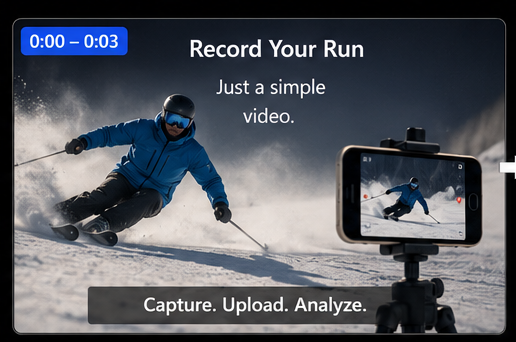
Start with the right video
Ski Analyzer Pro works best when the video gives the system a clear view of the skier’s movement. The recording does not need a special camera, sensors, or wearable device. A smartphone is enough, as long as the skier stays visible and centred.
For the cleanest result, film from the side. This view lets the analysis track the skier’s body position, turn shape, ski path, and timing through the whole movement. The skier should remain in frame from the start of the turn to the finish.
A useful filming setup looks like this:
Stand safely at the side of the piste.
Keep the skier centred throughout the turn.
Avoid heavy zooming or sudden camera movement.
Capture a full sequence of turns, not only the best moment.
Make sure the skis and body are visible as much as possible.
The better the video, the more useful the report becomes. A shaky clip from behind may still show some information, but a steady front view gives the analysis more to work with.
The goal is not to create a perfect film. The goal is to capture enough movement for the software to recognise what the skier is doing.
Upload and Analysis Mode turns a short clip into measurable feedback
Upload & Analysis Mode is the starting point. Once the video is uploaded, Ski Analyzer Pro automatically begins analyzing the movement by showing the progress bar. This is one of the core parts of the system because it changes a normal skiing video into structured performance data.
During analysis, the system looks for several key elements:
Body movement through each turn
Ski trajectory and turn shape
Turn timing
Left and right turn quality
Parallel skiing performance
Changes in movement across the run
The Ski Analyzer Pro shows the analysis stages visually. Rather than simply waiting for the process to finish, the skier or instructor can see progress monitors and understand what the system is checking.
This matters for trust. Many analysis tools feel like a black box, where a result appears without context. Ski Analyzer Pro gives a clearer sense of the process. The user can see that the system is identifying movement and building the report step by step.
The main benefit of Upload & Analysis Mode is speed. A short video becomes a complete skiing report without manual marking, spreadsheet work, or frame-by-frame review from scratch. For skiers, this means feedback arrives while the run is still fresh. For instructors, it means less time spent preparing technical notes and more time spent explaining what the skier should do next.
Replay Mode helps you see what you could not feel
Replay Mode is where the analysis becomes visual and practical. Skiing happens quickly, and many technical problems are too subtle to notice during the turn. Replay Mode slows the movement down and lets the skier inspect each part of the run.
You can replay every turn at your own pace. Move forward frame by frame, step backwards, pause, or watch in slow motion. This makes it easier to see fine details, such as when the skier begins the turn, where the turn reaches its apex, and when the turn finishes.
The trajectory map adds another layer. Instead of only watching the body, the skier can see the path of the turn as a shape. This helps connect feeling with reality. A turn that felt round may show a flatter section. A turn that felt balanced may show a delayed transition or a sharper finish.
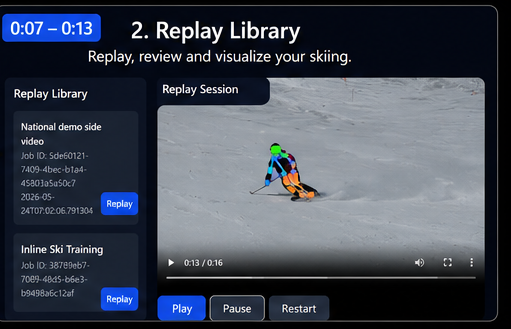
Each turn receives an objective score. This is valuable because it lets skiers compare left and right turns without relying only on memory. Many skiers have one stronger side. Replay Mode makes that difference visible.
The dashboard also highlights strong turns and areas that need improvement. This helps prevent a common training problem: focusing only on the mistake that feels obvious. Sometimes the most important issue is one the skier did not notice.
Replay Mode is especially useful for:
Checking turn entry, apex, and finish
Comparing left and right turns
Studying body movement in slow motion
Reviewing ski trajectory
Finding the strongest and weakest turns in a run
Discussing technique after a lesson
Another practical benefit is the turn summary PDF. A skier can download a summary and keep it for later review. An instructor can use it as a simple record of what happened in the session and what to work on next.
The biggest value of Replay Mode is clarity. It turns a fast movement into something you can study, repeat, and improve.
Compare Mode shows differences that are hard to spot alone
Compare Mode is designed for side-by-side learning. It lets the skier compare one run with another, such as a run by an instructor, a reference skier, or the same skier from an earlier session.
This is one of the most useful ways to train because skiing technique is often about timing and movement patterns rather than a single frozen position. A still image can show balance at one moment. A comparison video shows how the skier moves into, through, and out of the turn.
In Compare Mode, both runs play at the same time. This makes timing differences easier to recognize. For example, the viewer may notice that one skier starts the turn earlier, changes edges more smoothly, or finishes the turn with better control.
It also helps with movement differences. A skier can compare upper body stability, lower body steering, ski angle, and turn rhythm against a reference. Rather than hearing “move earlier” or “stay more centred” as abstract advice, the skier can see what that means in motion.
The objective scores make comparison more useful. Instead of guessing whether a run is closer to the reference, the skier can look at measurable performance. This gives the discussion a clearer base.
The Key Difference Summary adds another benefit. It automatically identifies the most important technical differences, so the user does not need to search through the whole video for every small variation. That makes Compare Mode useful for both independent practice and instructor-led sessions.
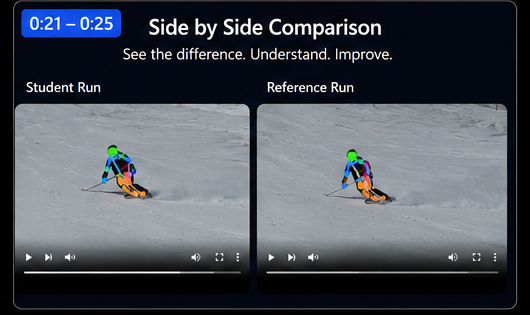
Compare Mode works well when the goal is to answer questions such as:
How does my turn timing differ from the reference?
Is one side weaker than the other?
Did my technique improve compared with an earlier video?
Am I matching the instructor’s movement pattern?
Which difference matters most right now?
This mode is not only for advanced skiers. Beginners and intermediate skiers often gain a lot from visual comparison because it reduces confusion. Instead of trying to imagine the correction, they can see the gap between their current movement and the target movement.
For instructors, Compare Mode can make feedback more direct. A short visual comparison often explains a point faster than a long verbal description.
AI Analysis Mode explains what to practise next
Scores and video markers are useful, but skiers still need to know what to do with them. AI Analysis Mode takes the report and turns it into easier guidance.
Rather than only displaying numbers, the AI explains multiple aspects of the skier’s technique in plain language. It can describe what the analysis suggests, where the movement is strong, and what the skier should practice next.
This is the mode that connects data to training. A skier may see a lower score on one side, but that alone does not explain the likely cause. AI Analysis Mode helps bridge that gap by interpreting the analysis in a way that is easier to understand.
The guidance can support different learning situations:
For students
For instructors
For repeat training
It gives personalized feedback after a run, making solo practice more focused.
It saves time when preparing lesson notes and helps explain technical points more clearly.
It helps track whether the skier is working on the same issue or improving over time.
The best use of AI Analysis Mode is not to replace coaching. It is to make feedback easier to act on. A skier can take the AI explanation, watch the replay, compare it with a reference, and then return to the slope with one or two clear practice goals.
Good practice goals are specific. “Improve carving” is too broad. A better goal might be to start the turn earlier, keep the upper body calmer, or make left and right turns more even. AI Analysis Mode helps move the feedback towards that kind of practical instruction.
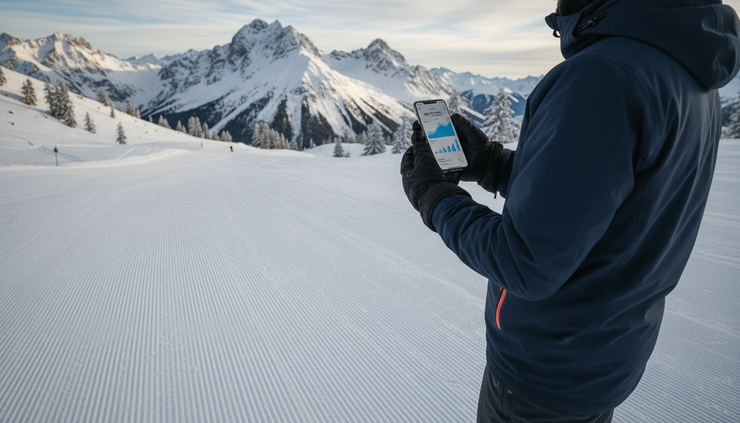
How the modes work together
Each mode has a clear purpose, but the real strength comes from using them as a sequence.
Upload & Analysis Mode creates the report. Replay Mode lets the skier inspect the actual movement. Compare Mode shows the difference between two runs or two skiers. AI Analysis Mode explains what to practice next.
A simple workflow might look like this:
Record the run
Film from the side and keep the skier centred.
Upload the video
Let Ski Analyzer Pro detect movement, turn timing, ski trajectory, and parallel skiing quality.
Review the report
Check the dashboard and identify strong and weak turns.
Use Replay Mode
Watch the key turns slowly and study the trajectory map.
Use Compare Mode
Compare the run with an instructor, reference video, or previous performance.
Read the AI guidance
Choose one or two practice points for the next run.
This flow helps avoid scattered practice. Instead of trying to fix everything at once, the skier can focus on the biggest technical difference or the most repeated weakness.
Which mode gives the biggest benefit
The best mode depends on the task, but each one answers a different question.
Mode | Best question it answers | Main benefit |
Upload & Analysis Mode | What happened in this run? | Turns a short video into a structured skiing report. |
Replay Mode | Where exactly did the movement change? | Shows turn phases, trajectory, and scores at a controllable pace. |
Compare Mode | How is this run different from a reference? | Makes timing and movement gaps easier to see. |
AI Analysis Mode | What should be practiced next? | Translates analysis into clear guidance. |
For a first-time user, Upload & Analysis Mode and Replay Mode usually provide the fastest understanding. For a skier working with a coach, Compare Mode can be especially powerful. For anyone training between lessons, AI Analysis Mode helps keep practice focused.
The system is most useful when the feedback leads to a specific next run. Watch the movement, identify the key issue, practice it, then record again. That cycle is where improvement becomes easier to track.
The main takeaway
Ski Analyzer Pro keeps the operation simple: film a short side-view video, upload it, and review the analysis. Behind that simple flow, the software checks body movement, ski trajectory, turn timing, and parallel skiing quality.
Each mode adds a different layer of value. Upload & Analysis Mode creates the report. Replay Mode makes the movement visible. Compare Mode shows measurable differences. AI Analysis Mode explains what to do next.
For skiers, the benefit is clearer practice. For instructors, it is faster and more consistent feedback. The biggest improvement often starts with seeing the detail that was impossible to feel during the turn.

Comments